
AI staff for small businesses
Hand the office work to AI.Your team approveswhat goes out.
Client replies, quotes, proposals and meeting minutes. A team of AI agents does the drafting, and a person on your team checks and approves before anything leaves.
Tell us how your office works today and we'll show you what AI can take on. A demo commits you to nothing.
- No IT staff needed
- Keep the tools you use
- Start on the Free plan
- Working
- 3
- To approve
- 5
- Done
- 18
- SalesSales adminWorking
Drafting a quote for Example Trading Co.
- ResearchResearchTo approve
Client brief ready for review
- Customer careRepliesDone
4 reply drafts
- Quote #A-1024Drafted by AI
- Meeting minutes, 14 OctDrafted by AI
- Reply to a client enquiryDrafted by AI
Sound familiar?
Too much of the work sits with one person.
So AI Office is not another tool to learn. It is a team of AI staff that does the drafting, while your people keep the final say.
What it does
Your AI staff handle the routine office work.
Pick the work you want to hand over. You review what comes back.
How it works
AI does the work,a person approves it.
Of the four stages, the one that affects anyone outside your company is decided by a person.
Reads emails, PDFs and your existing records.
We set up where it reads from to match how you work.
The agent in charge drafts the document in your format.
Same wording and fields you use today.

A person checks the amount, terms and recipient, then approves or rejects.
By default, nothing leaves without a person's approval. Anything started by an email or a schedule always waits.
By default, nothing leaves your company before it is approved.
Rejected.Nothing is sent or saved. Send it back for changes.
Only approved work is sent or saved to your tools.
Rejected work is not carried out, and the rejection is recorded.
The AI does not send things on its own.
Emails and actions in outside tools wait for a person to check and approve them.
- Nothing sent before approval
- Reject any draft
- Set it per agent
Not just a chatbot
A chatbot answers you. AI Office gets the work done.
ChatGPT and Claude tell you how to do it. AI Office drafts it in your format, waits for a person to approve it, and then sends or saves it.
- 01
Receive
Chat assistant
Reads what you paste in
AI Office
Reads enquiry emails, PDFs and your records
- 02
Draft
Chat assistant
Explains how to write it
AI Office
The agent in charge drafts it in your format
- 03
Check and approve
Chat assistant
Stops here
Turning it into a document and sending it is still your job.
AI Office
A person approves
A person checks the amount, terms and recipient, then approves or rejects
- 04
Send or save
Chat assistant
Not part of it
AI Office
Only approved work is sent or saved to your tools
Why AI Office
Easy to start, easy to stop.
Getting started
No IT staff needed
Our dedicated Philippines and Japan team sets it up with you, and the AI agents do the daily work.
Works with the tools you have
Gmail, Google Drive, Calendar and Meet are fully supported. No need to switch systems.
If you want to stop
Start free, decide later
Try it on real work on the Free plan before you pay for anything.
Hand any task back to a person
Any task can go back to a person at any time. You decide what the AI does.
For every team
Each team has work it can hand over first.
Examples of the work AI Office is built for. We'll sort out what to hand over together in the demo.
Management
01 / 06First work to hand over
- Morning summary
- Meeting minutes and follow-ups
In every case the AI drafts, and a person approves before anything is sent or saved.
Sales
02 / 06First work to hand over
- Client replies
- Quote and proposal drafts
In every case the AI drafts, and a person approves before anything is sent or saved.
Accounting
03 / 06First work to hand over
- Checking records against each other
- Payment reminder drafts
In every case the AI drafts, and a person approves before anything is sent or saved.
Admin
04 / 06First work to hand over
- Filing and sorting documents
- Answers from manuals
In every case the AI drafts, and a person approves before anything is sent or saved.
Marketing
05 / 06First work to hand over
- Post drafts in your brand voice
In every case the AI drafts, and a person approves before anything is sent or saved.
Professional services
06 / 06First work to hand over
- First reply to enquiries
- Sorting client documents
In every case the AI drafts, and a person approves before anything is sent or saved.
Any team that writes and checks the same kinds of documents again and again is a good fit.
The product
See who is doing what, and how far it has got.
Your AI agents sit in their departments in a 3D office. Assignments, schedules and items waiting for approval each have their own screen.
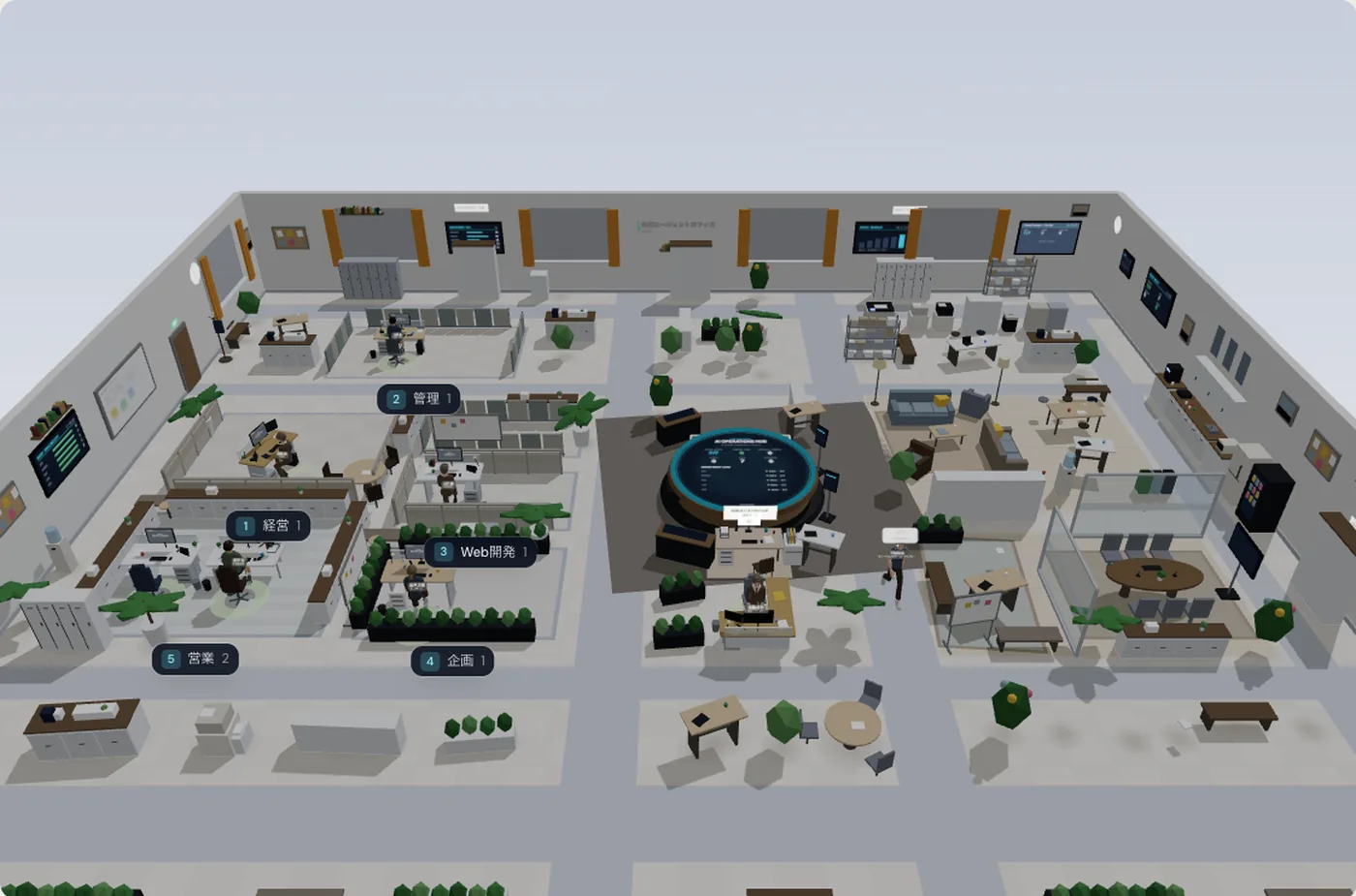
Org chartWho handles what, and who reports to whom. CalendarSchedule one-off and repeat work. ApproveA person checks what the AI drafted before it goes out.
Screens are from a development build and show the Japanese interface. Projects and names are demo data.
Over time
The more you use it, the more it knows about your business.
No need to explain the same thing twice. Documents you add and procedures you save are used from the next request on.
Company documents3
- Staff handbookAddedCited
- Service manualAddedCited
- Quote templateAddedCited
Company documents3
- Staff handbookCited
- Service manualCited
- Quote templateCited
Procedures2
- How we write a quoteAdded
- Client onboarding stepsAdded
Company documents3
- Staff handbookCited
- Service manualCited
- Quote templateCited
Procedures2
- How we write a quote
- Client onboarding steps
Scheduled work2
- Weekly client follow-upsAdded
- Morning summaryAdded
Answers come from your own documents.
When an answer is based on your files, it shows which document it used.
Getting started
Start with one task, on your real work.
Our Philippines and Japan team handles the setup. All we need from you is how the work runs today, and a check of what comes back.
- 01
Free demo
Online, about 30 to 45 minutes
What we do
Listen and suggest where to start
We look at how your office works and show you what AI can take on, and what it should not.
What you do
Walk us through your work
- 02
Try it free
As long as you need
What we do
Help with setup and tuning
Run one task on real documents and data. Check the accuracy for yourself.
What you do
Share sample documents and check the results
- 03
Roll it out
Reviewed monthly
What we do
Monthly check-in and adjustments
Move to a paid plan, add more work, and review it each month. Any task can go back to a person at any time.
What you do
Daily approvals and a monthly review
Your part is only the lower row.
Try it before you pay.
Run it on real documents on the Free plan and see how accurate it is. Decide on a paid plan after that.
Pricing
Start free. Upgrade when it pays for itself.
Priced per company workspace, not per user.
AI usage is billed separately
Your agents run on your own Claude or OpenAI account, so you pay the AI provider directly for what you use. Set monthly and daily caps so the bill never surprises you.
Pay yearly and get 2 months free on any paid plan. Prices include VAT.
Connect, extend, do more.
Works with the tools you already use.
22 apps connect out of the box, and you can add your own through MCP or an API.
- Gmail
- Google Calendar
- Google Meet
- Zoom
- Trello
- Slack
- GitHub
- Outlook
- HubSpot
- Notion
Microsoft 365: mailbox read and draft only. Voice in meetings works in Google Meet.
Stay in control
You decide what the AI may do, and you can check it later.
Set where the AI stops and a person decides. Everything is logged, and you can stop it at any time.
What needs approval
Sending email
Actions in outside tools
Scheduled and automated work
On by default
Email and outside actions can be switched on here too. Email can also be set per agent.
Outside instructions cannot trigger a send
If an email or a PDF says "send this", that alone does nothing. Automated work waits for approval by default.
Permissions per agent
Accounting system
Admins only.
CRM
Only the agents you choose.
Client list
Every agent can use it.
Sensitive tools are handled by admins only; exclusive tools belong to one agent. Combine them with the Global or Individual scope.
A record of who did what
| Date and time | By | Action |
|---|---|---|
| 08 Sep 09:12 | Maria (Owner) | Added the member "Accounts" |
| 08 Sep 14:30 | Jose (Admin) | Set the accounting system to "Sensitive" |
| 09 Sep 10:05 | Jose (Admin) | Added the document "Quote template" |
| 10 Sep 17:48 | Maria (Owner) | Exported the audit log as CSV |
Only owners and admins can see it.
Stop it, cap it
Run scheduled work
AI usage this month (against your monthly cap)
62%
Agents pause on their own if errors repeat or the monthly cap is reached.
Security
See exactly how your data is handled, before you sign up.
Choose our managed cloud or run it on your own server. Our managed cloud runs on servers in Japan. If your data must stay in your own country, we can install it on your own server.
How it runs
Technical details
| Item | Details |
|---|---|
| Sign-in | 6-digit email code, Google or GitHub. Optional workspace password and allowed email domains. |
| Stored credentials | Tokens and mail passwords are encrypted with AES-256-GCM. API keys are stored only as a hash. |
| Connections | All traffic to outside services is encrypted with HTTPS. |
| Roles | Owner, admin and member, enforced by the API. |
| Your data | Audit trail of changes. The owner can export the data; deleting a workspace removes its files and records. |
About the documents you share with us
Please share documents without personal data during the demo. We'll send full technical details on request.
FAQ
Frequently asked questions
The questions we hear most. Anything else, just ask in the demo.
Next step
Before you bring in AI,find out what it can take off your plate.
A demo does not commit you to anything. Pick whichever suits you.
Contact
Free demo and overview
Tell us a little about your business and we'll get back to you by email.
- Online, about 30 to 45 minutes
- We show you what AI can take on, and what stays with a person
- A demo does not commit you to anything
Prefer email?t-ono@smartcontents.co.jp